Upload a PNG, JPG, or WebP and get vector SVG paths back. Use it on logos, icons, and flat illustrations, then animate the result in the same project.
Updated .
Image to SVGConverter
To convert an image to SVG, upload a PNG, JPG, or WebP in the editor's Image tab and run the conversion. SVG Weave sends it to a vectorization model that traces the picture into SVG paths and fills, and returns editable SVG code. It works best on logos, icons, and flat illustrations. Photographs convert to a stylized approximation, not a faithful copy. Each conversion costs a fixed 50 credits.
Convert and animate
Upload in the Image tab
Drop a PNG, JPEG, or WebP into the SVG input node. Keep it under about 7.5MB.
Run the conversion
The vectorizer traces your image into SVG paths. The result appears as a node with ids on each element, and costs 50 credits.
Edit, animate, or download
Download the SVG, tweak elements, or connect it to a Render node and describe the motion you want.
What the converter does
- Real vector output
- Paths and fills, not an embedded bitmap. The file scales cleanly and stays small for flat artwork.
- Auto-cropped viewBox
- The artwork is cropped to its content, so you do not carry blank margins from the source image.
- Same project as animation
- The converted SVG flows into prompt and render nodes without a download and re-upload.
What converts well, and what does not
Flat artwork with clear shapes, limited colors, and strong edges is the best input: logos, line icons, simple illustrations, and badges. The output is a set of filled and stroked paths that scale to any size without blur.
Photos, soft gradients, and busy textures are a poor fit for vector tracing. You will get a simplified shape-based version that can be useful as a stylized graphic, but do not expect it to match the original pixel for pixel. If exact reproduction matters, keep the raster.
What you get back
The result is standard SVG: paths with fills, some with gradients, and classes defined in a style block. The editor assigns an id to every element so you can select and animate parts individually. The conversion crops to the artwork automatically (auto-crop is on), so the viewBox fits the traced shapes rather than the full image.
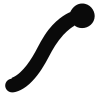
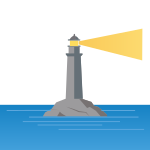
Expect the model to merge or simplify some shapes. In our test, a 512px PNG of a single brushstroke mark came back as one path with about 600 bytes of code. A scene with multiple objects came back as dozens of separate paths.
Limits and cost
Accepted formats in the upload field are PNG, JPEG, and WebP. The API rejects images that are larger than about 7.5MB once decoded, so resize big files first. There is no GIF or BMP support in the image tab.
A conversion reserves and bills a fixed 50 credits, regardless of image size. If the conversion fails, the reserved credits are released. A 150-credit pack therefore covers three conversions.
Animating the converted SVG
The converted SVG appears as a node you can connect straight to a Render node. Because traced output often comes back as a few large paths, per-part animation depends on how the model split the shapes. If a shape you want to move is merged into its neighbor, prompt a different way, or convert a cleaner source image with the parts separated.
Made with SVG Weave
Single-shape mark
Real vectorization output. Source: a 512px PNG of SVG Weave’s earlier brand mark (public/examples/image-to-svg-1-source.png), converted with the same vectorize call the product uses. The file is unedited apart from removing a generator comment.
Multi-object illustration
Real vectorization output. Source: a 600px PNG rendered from the lighthouse SVG on the text-to-SVG page, so this round-trips an AI SVG through raster and back. Unedited apart from removing a generator comment.
Questions
What image formats can I convert?
PNG, JPEG, and WebP through the Image tab. Convert other formats to one of these first.
Is the converted SVG a true vector?
Yes. The output is SVG paths and fills that scale without losing sharpness. It is not a bitmap wrapped in an SVG tag.
Will a photo convert well?
Not faithfully. Photos become stylized, simplified shapes. Vectorization is much better for logos, icons, and flat illustrations.
Is there a size limit?
The upload API rejects images over about 7.5MB decoded (10 million base64 characters). Larger files are not auto-resized, so shrink them before uploading.
How much does a conversion cost?
A fixed 50 credits per conversion. Credit packs start at 150 credits for $5, which is three conversions. Credits are released if the conversion fails.
Can I edit the SVG afterwards?
Yes. It is plain SVG you can open in any editor, and inside SVG Weave you can select elements and prompt changes to them.
Does it keep transparency?
Traced shapes are returned as paths, so empty areas are generally transparent. Solid background areas in your source will usually come back as shapes. Remove the background from the source first if you do not want that.
How is this different from text to SVG?
Image to SVG traces an image you provide. Text to SVG invents a new drawing from a written description. Both cost 50 credits.
Related tools
Text to SVG Generator
Generate a static SVG illustration or icon from a text description, with an optional reference SVG for style. 50 credits per generation. Clean vector code.
SVG Animation Generator
Describe the motion in plain English and get an animated SVG with embedded CSS @keyframes. Works on SVGs you upload, paste or generate. No JavaScript.